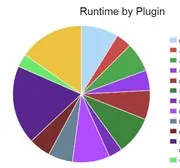
 Website Tips 4 U currently has 25 active plugins. Whilst this can be a manageable number, it would still be nice to be able to get by with fewer plugins to reduce page loading times.
In fact I use a Performance Profiler plugin to check which plugins might take too long to load and have thus eliminated where possible the most taxing plugins time-wise.
The Pingdom Speed Test records the following for Website Tips 4 U but it would be nice to reduce the load time further. [Read more…]
 If it is done correctly, a sticky widget can be very effective on your blog. There are a number of methods that you can use to make a WordPress widget sticky. These include adding some code or installing a plugin that can do the job for you.
 There is so much debate about whether or not you should display the date in your WordPress posts. The post date of publication is in fact displayed by default.
 Tip of the Day: WordPress Website Maintenance
 You can waste a lot of time browsing through various WordPress themes. Themes generally look very appealing and this is one of the reasons that you have probably found yourself hours later still clicking that next button, as you continue to browse through the gallery of themes on offer.